


In the ever-evolving landscape of cyber security, one constant threat that businesses and individuals continue to face is the proliferation of fake virus scams. These nefarious tactics are employed by cybercriminals looking to exploit vulnerabilities for their gain. Understanding what these scams are, how to identify them, and the steps you can take to protect yourself are crucial in maintaining your digital safety. In this article, we’ll delve into the world of fake virus scams and offer guidance on safeguarding your personal and business information.
What Are Fake Virus Scams?
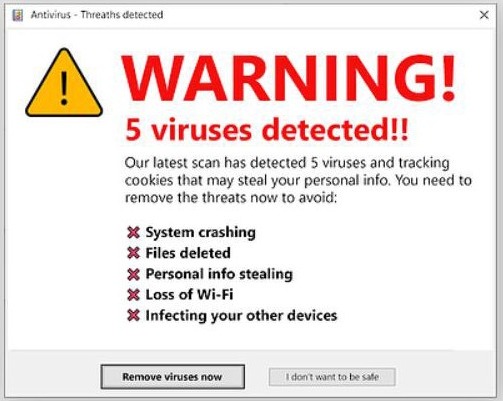
Fake virus scams are deceptive schemes that trick individuals into believing their computer or device is infected with a virus, often prompting them to download malicious software or hand over sensitive information. These scams can come in various forms, such as fake virus alerts, fraudulent system warnings, or bogus security software pop-ups.
The Anatomy of a Fake Virus Scam
Typically, a fake virus scam starts when a user encounters a pop-up window or alert claiming that their system is infected. This alert may appear to be from a legitimate source, such as a well-known antivirus software provider. The message might urge the user to take immediate action, such as clicking on a link or button to remove the supposed virus.
The link can lead to a fake virus download or a website that mimics a genuine cyber security service. Once the user follows the instructions, they may inadvertently install malware on their device or provide cybercriminals with access to their personal or financial information.
Recognizing Fake Virus Scams
To avoid falling victim to these scams, it’s important to recognize their common characteristics.
Suspicious Pop-up Alerts
Be wary of unexpected pop-up windows or alerts that claim your computer is infected. Legitimate antivirus software typically does not advertise or inform about threats through pop-ups in your web browser.
Urgent Calls to Action
Scammers often create a sense of urgency to pressure victims into acting quickly without thinking. If an alert urges you to act immediately, it’s a red flag.
Unfamiliar Software Promotions
If the alert promotes antivirus software that you’ve never heard of or didn’t install, it’s likely a scam.
Requests for Personal Information
Any request for personal or financial information in exchange for virus removal should be treated with suspicion.
The Impact on Businesses and Individuals
Fake virus scams can have severe consequences for both businesses and individuals. They can lead to data breaches, financial loss, and damage to a company’s reputation. For individuals, the impact can range from identity theft to the loss of irreplaceable personal data.
Cyber Security Business Concerns
Businesses must be particularly vigilant as they often possess sensitive customer data. A successful scam can compromise client trust and lead to costly legal and recovery efforts.
Cyber Security IT Companies’ Advice
Reputable cyber security IT companies like Fisch Solutions advise that education and prevention are the best defenses against fake virus scams. They recommend regular training for employees and the implementation of robust security measures.
How to Protect Yourself and Your Business
Protecting against fake virus scams requires a proactive approach. Here’s what you can do to minimize the risk:
Update and Educate
Ensure that all software, especially antivirus and operating systems, are up-to-date. Educate yourself and your employees about the latest scam tactics.
Install Reputable Antivirus Software
Use trusted cybersecurity software from reputable companies. These programs can detect and block many fake virus scams.
Verify Alerts
If you receive an unexpected virus alert, don’t click on any links. Instead, run a scan using your installed antivirus software to check for issues.
Use Browser Security Features
Modern web browsers include security features that can help block malicious websites. Make sure these features are enabled.
Backup Data Regularly
Regular backups can help mitigate the damage in case of a data breach. Use a reliable backup solution and test it regularly.
What to Do If You Encounter a Fake Virus Scam
If you suspect you’ve come across a fake virus scam, take the following steps:
Do Not Interact with the Alert
Avoid clicking on the alert or following any of its instructions. Close the browser or application if possible.
Disconnect from the Internet
If you’re unsure whether your device is compromised, disconnect from the Internet to prevent potential malware from transmitting data.
Run a Full System Scan
Use your legitimate antivirus software to run a comprehensive scan of your system.
Report the Scam
Consider reporting the scam to relevant authorities or cyber security organizations. This can help prevent others from becoming victims.
Seek Professional Help
If you’re unable to resolve the issue, contact a professional cyber security IT company for assistance.

by Evan Wise (https://unsplash.com/@evanthewise)

Have a Potential Fake Virus Pop-Up on your Computer?
Fisch Solutions stands out as the go-to solution when encountering a fake virus pop-up on your business computer due to their extensive expertise and experience in cybersecurity. With a strong focus on education and prevention, Fisch Solutions emphasizes the importance of regular training for employees and the implementation of robust security measures to combat fake virus scams effectively. By choosing Fisch Solutions, you can benefit from their proactive approach to cybersecurity, ensuring that your business is well-protected against potential threats.
Moreover, Fisch Solutions recommends using reputable antivirus software from trusted cybersecurity companies to detect and block fake virus scams efficiently. Their emphasis on updating software regularly and educating both you and your employees about the latest scam tactics demonstrates their commitment to staying ahead of cyber threats. By following Fisch Solutions’ guidance, you can minimize the risk of falling victim to fake virus scams and safeguard your business data and operations effectively.
In addition, Fisch Solutions encourages users to verify alerts, avoid interacting with suspicious pop-ups, and run comprehensive system scans using legitimate antivirus software. Their dedication to empowering users with the knowledge and tools needed to combat cyber threats sets them apart as a reliable partner in cybersecurity. By reaching out to Fisch Solutions when faced with a fake virus pop-up, you can access professional assistance and guidance to navigate the complexities of cybersecurity and protect your business from potential harm.
Have a fake virus pop up on your business computer system? Call Fisch to make sure it has not loaded a virus into your system or complete the below form to discuss how we can prevent these pop ups from damaging your business or organization computer system.